Models
The Models page helps you find an open-weight base model to fine-tune: a curated catalog with filters, a live search of the Hugging Face Hub, and a detail view with licence and memory needs.
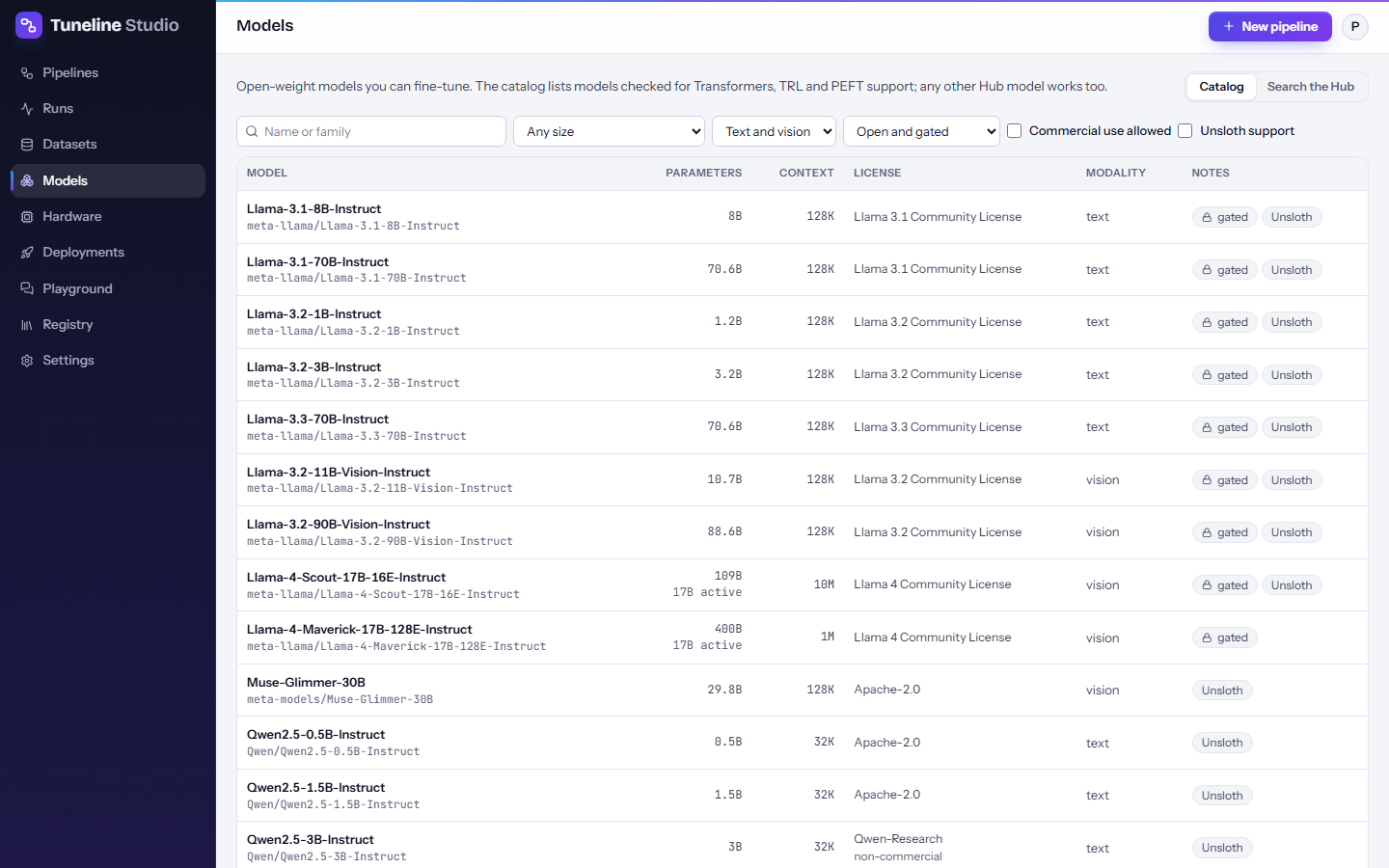
The catalog
The Catalog tab lists 237 open models from 37 families (Qwen, Llama, Gemma, Mistral, Phi, DeepSeek, Granite, OLMo, SmolLM, InternVL and more), from 135 million parameters (SmolLM2-135M-Instruct) up to trillion-parameter mixture-of-experts models. Each one has been checked for Transformers, TRL and PEFT support. Any other model on the Hub works too; the catalog is just a good starting point.
The table shows, for each model:
| Column | What it shows |
|---|---|
| Model | Display name and Hugging Face repository id. |
| Parameters | Total size in billions; for mixture-of-experts models also the active parameters per token. |
| Context | Maximum context length. |
| License | Licence name, with "non-commercial" when commercial use isn't allowed. |
| Modality | Text, vision or multimodal. |
| Notes | gated (you need access on Hugging Face), Unsloth (official Unsloth support), multi-GPU (only trainable across several GPUs). |
Filters
Above the table:
- Name or family: search by name, repository id or family.
- Size: Any size, Up to 2B (CPU or any GPU), 2B to 9B (one 24 GB GPU), 9B to 35B (48-80 GB GPU) or Over 35B.
- Modality: Text and vision, or one modality.
- Access: Open and gated, Open download only or Gated only.
- Commercial use allowed: hides models whose licence doesn't allow commercial use.
- Unsloth support: only models with official Unsloth support.
Click a row to open the model's details.
Search the Hub
The Search the Hub tab searches all of Hugging Face live. Type at least two letters (for example qwen3 instruct); results are sorted by downloads and show size, context, licence and downloads where the Hub provides them. Click Details to open a model. Any public or gated model that Transformers can load works.
Model details
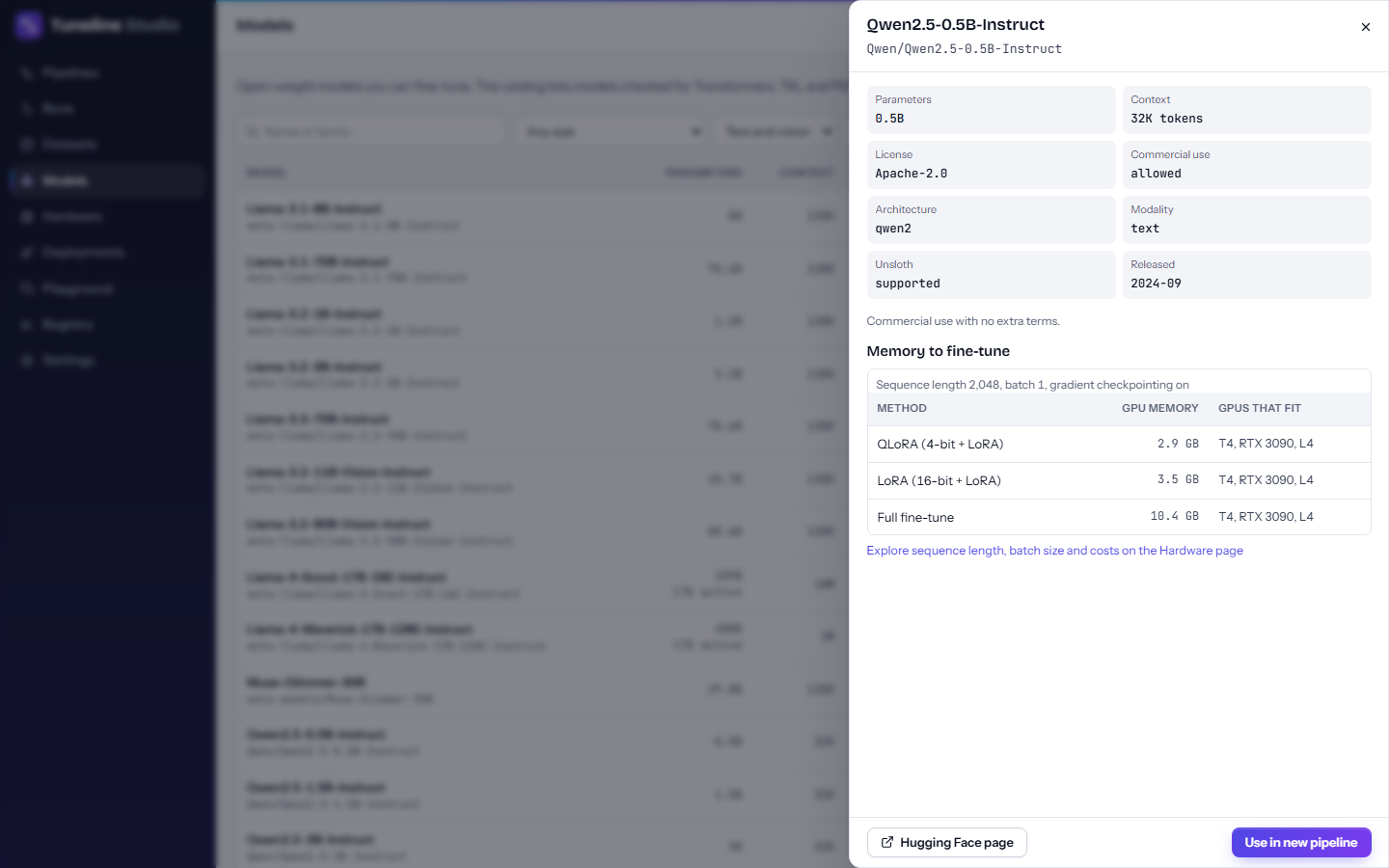
The detail panel shows:
- Parameters, Context, License, Commercial use (allowed, not allowed or check the license), Architecture, Modality, Unsloth and Released, completed with live facts from the Hub.
- Notes about the licence, and warnings about the repository when there are any.
- For gated models, a reminder of how to get access (see below).
- Memory to fine-tune: a table with the GPU memory needed for QLoRA (4-bit + LoRA), LoRA (16-bit + LoRA) and Full fine-tune, and up to three single GPUs that fit each. The figures assume a sequence length of 2,048 tokens, a batch of 1 and gradient checkpointing on. "Needs several GPUs" means no single GPU in the price list is large enough.
- A link to Explore sequence length, batch size and costs on the Hardware page, which opens the hardware advisor with this model filled in.
At the bottom:
- Hugging Face page opens the model on huggingface.co.
- Use in new pipeline opens the New pipeline dialog with this model as the base model. For a text model the Chat assistant template is preselected, for a vision model the Document and image understanding template; you can pick another template before clicking Create pipeline.
You can also pick a model inside the editor: on a Base model step, click Browse next to Model to open the same catalog and Hub search, or type a repository id directly.
Gated models
Some models, including Llama and Gemma, are gated: Hugging Face only lets you download them after you accept their licence. To use one:
- Open the model's page on Hugging Face (the Hugging Face page button) and accept the licence with your Hugging Face account. Some publishers review requests, so access may not be immediate.
- Make sure the Hugging Face token saved in Settings → API keys belongs to that same account.
- Run the pipeline as usual.
Warning
If a run fails with a 401 or 403 error from the Hub while downloading the model, the token's account hasn't been granted access yet. Accept the licence with the account that owns your token.
Choosing a base model
There is no single best model; the right choice balances quality, speed, cost and licence. Some guidance:
Start small. A 1–4B model fine-tuned on good data often does very well on a narrow task (classifying alerts, extracting fields, answering in a fixed style). It trains in minutes, fits on free GPUs and is cheap to serve. Move up in size only if evaluation shows you need to.
Size decides the hardware. As a rough guide from the size filter:
| Size | Typical hardware for fine-tuning |
|---|---|
| Up to 2B | Any GPU, and small ones even on a CPU for tests |
| 2B to 9B | One 24 GB GPU (QLoRA or LoRA) |
| 9B to 35B | A 48–80 GB GPU |
| Over 35B | Large or several GPUs; check the Hardware page |
QLoRA needs the least memory, LoRA a bit more with slightly better quality, and full fine-tuning much more. Use the memory table in the model details or the Hardware page for your exact settings. The largest catalog models (200B+) are marked too large for single-machine fine-tuning in Tuneline.
Instruct or base? For chat assistants, classifiers and most task-specific work, start from an instruct (chat) version, usually named -Instruct or -it: it already follows instructions and has a chat template, so a few hundred good examples go a long way. A base model (without that suffix) is the better starting point for continued pretraining on your own documents, or when you want full control over the chat style.
Match the modality. For images (documents, receipts, screenshots), pick a vision model and use the Vision fine-tune (SFT) step.
Check the licence before you commit. Use Commercial use allowed if you plan to use the model in a product. Examples at the time of writing: Qwen3 and SmolLM are Apache-2.0 and Phi is MIT; Llama uses the Llama Community licence (gated, with conditions such as a limit on monthly users for commercial use); Gemma uses the Gemma Terms of Use (gated). Always read the full licence on the model's Hugging Face page.
Consider serving. A model that is cheap to fine-tune can still be expensive to serve if it's large. The Hardware page also estimates the memory needed to serve the trained model.
Note
The Unsloth support badge describes the model. The Use Unsloth training setting currently falls back to standard training because current Unsloth releases need an older TRL version than Tuneline uses; the run log says when this happens.